
Our Cloud Run Bill Had a Bot Problem. Cloudflare Fixed It.
Google Cloud Run promises a simple deal: you only pay for what you use. Scale to zero when idle, scale up when traffic arrives. No waste.
What the deal doesn't mention is that bots count as traffic.
The day we pointed a custom domain at our Cloud Run service, the bots found it within hours. Requests to /.env, /wp-login.php, /admin/config, /.git/HEAD, and hundreds other paths not part of our endpoints. All of them returned 404 http error and every single one of them woken up our idle instance.
We were paying for traffic we never wanted, from visitors we never invited, to endpoints that don't exist. The scale-to-zero promise was still technically true, but we just hadn't accounted for how much the internet enjoys waking things up.
This is how we fixed it, without moving to a different cloud, without a load balancer, and without spinning up a dedicated API gateway. Just Cloudflare, a Proxied CNAME, and about thirty lines of JavaScript.
The Hidden Cost of Scale-to-Zero
Cloud Run is seductive. You deploy, it scales up when you need it, scales to zero when you don't. You only pay for what you use. The pitch is compelling, and mostly true.
What the pitch doesn't dwell on is what happens the moment the service gets a domain name and DNS resolves it to something the internet can reach. The internet will probe it. Not because anyone’s specifically targeting you. Just because that's what the internet does. Automated scanners, vulnerability bots, credential stuffers sweep the entire IP space continuously. The moment the hostname resolves, it's added on the list.
Every probe that hits a scale-to-zero service is a cold start. Every cold start costs compute time. The math doesn't care that the request was garbage.
/.env                     → 404  (bot looking for exposed secrets)
/wp-login.php             → 404  (WordPress scanner, even if we were not running WordPress)
/.git/HEAD                → 404  (source code exposure check)
/admin                    → 404  (generic admin panel probe)
/api/v1/users             → 404  (API endpoint fishing)
Five requests. Five cold starts. Five billing events. If we multiply that by thousands of bots, running continuously, and the numbers become uncomfortable fast to the point of preventing the service to going idle when it's not processing real user requests.
Why Not Just Firewall the Origin?
The obvious instinct is to lock down the Cloud Run service directly. Set it to require authentication. Use a VPC connector. Restrict ingress to internal traffic only.
All these approaches are valid, and in some architectures they're the right ones. But for us, they would add infrastructure complexity, increase the operational scope without even preventing those requests from arriving.
The most efficient place to stop bad traffic is as close to the source as possible. Ideally, before it ever leaves the CDN edge.
That's exactly what Cloudflare lets users do.
The Architecture: Put Cloudflare in Front of Everything
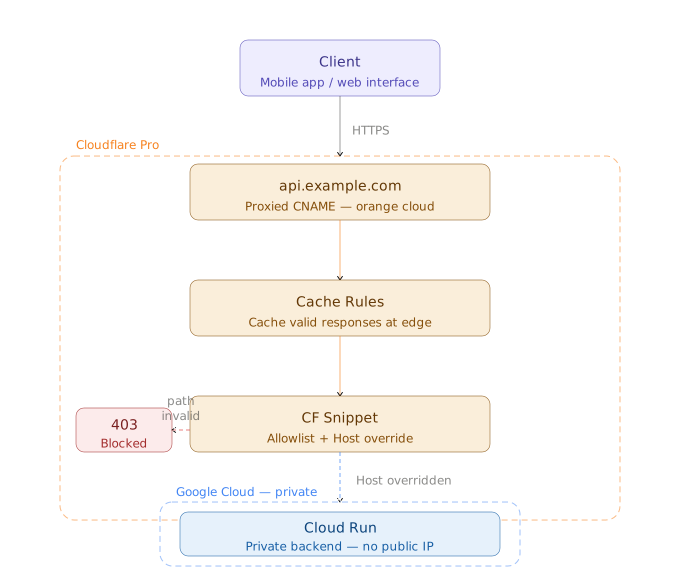
As in the diagram, the architecture is very simple. api.example.com is a CNAME record in Cloudflare DNS, pointing at the Cloud Run service URL with the Proxy toggle enabled.
That single toggle changes everything. With this configuration, the world internet sees the Cloudflare's IP addresses when resolving api.example.com while the Cloud Run service URL (the-service-abc123-ew.a.run.app) remains invisible.
# DNS record (Cloudflare dashboard)
Type:    CNAME
Name:    api
Target:  the-service-abc123-ew.a.run.app
Proxy:   Enabled
A CNAME rather than an A record because Cloud Run service URLs don't resolve to static IPs. A CNAME lets Cloudflare resolve the origin dynamically. This is a small detail, but it matters.
From this point forward, every request to api.example.com passes through Cloudflare's edge before it can get anywhere near Google Cloud. That means every Cloudflare rule, every filter, every cache decision happens before the request ever touches the origin.
The Gatekeeper: A Cloudflare Snippet
Cloudflare Snippets are small JavaScript functions (lightweight edge workers, essentially) that run on Cloudflare's global network before a request is forwarded to the origin. On the Pro plan, they’re the right tool for endpoint filtering. Snippets are free and have been made generally available to Pro users since 2025 (announced in the article Cloudflare Snippets Are Now Generally Available).
The snippet does two things:
-
First, it checks the incoming request path against an allowlist of valid API endpoints. Call to endpoint not allowed will return a
403 Forbiddenresponse, immediately, at the edge. Which prevents Cloud Run from waking up. No compute is consumed. No billing event occurs. -
Second and this is the part that trips people up. It rewrites the
Hostheader before forwarding valid requests to the origin.
The Host Header Problem
When Cloudflare forwards a request to the origin, it sends the original incoming hostname as the Host header and in this case it’ll be api.example.com. Since Google receives api.example.com instead of the actual service hostname (the-service-abc123-ew.a.run.app), it doesn't know what to do with it, a 404 error response will be returned.
The snippet must explicitly rewrite the Host header to the Cloud Run service hostname before forwarding. With this, request will reach the origin and wake up an instance if needed.
// TODO: replace with the Cloud Run URL
const CR_ORIGIN = 'the-service-abc123-ew.a.run.app';

const PATHS = [
    '/api/v1/endpoint-one',
    '/api/v1/endpoint-two',
    // add the valid endpoints here
];
export default {
    async fetch(request) {
        const url = new URL(request.url);
        let targetReq = request;
        if (url.hostname === "api.example.com") {
            const isAllowed = PATHS.some(prefix => url.pathname.startsWith(prefix));
            // Anything not on the allowed paths is dead on arrival.
            // It never reaches Cloud Run. No cold start. No cost.
            if (!isAllowed) {
                return new Response("Forbidden", { status: 403 });
            }
            // Critical: set the Host header to the Cloud Run hostname,
            // not the public-facing domain. Without this, Cloud Run
            // cannot identify the target service and the request fails.
            url.hostname = CR_ORIGIN;
            targetReq = new Request(url.toString(), request);
        }
        return fetch(modifiedRequest);
    }
};
The snippet above can be added to the api.example.com hostname rule in the Cloudflare dashboard, and the edge start protecting the door. The origin becomes, effectively, private and only reachable through the proxy and exclusively for paths we explicitly allow.
Cache Rules: Stop Repeating at the Origin
For requests that do pass the snippet, Cloudflare Cache Rules can be used to determine whether a cached response can be served instead of hitting the origin. But, not every API endpoint should be cached, like dynamic response, user's specific or write endpoints should bypass the cache entirely. If the cache is configured on the domain level, remember disabling it for the api endpoints by using the cache rule.
# Cache Rule (Cloudflare dashboard)
When: hostname is api.example.com
Then: Do not cache anything
DDoS: The Bill Attack Vector Nobody Talks About
A distributed denial-of-service attack against a traditional server is about availability where the attacker's goal is to overwhelm the target until it stops responding. Against a scale-to-zero cloud service, the attack surface is different. We don't necessarily need to take the service down to hurt the operator. We just need to generate enough legitimate-looking traffic to drive the cloud bill to an uncomfortable level.
Cloudflare Pro's DDoS protection operates at Layer 3/4 (network) and Layer 7 (application). Volumetric attacks are absorbed at the edge. WAF rules block common attack patterns before they reach the snippet logic.
The combination means that even a sustained, coordinated attack against api.example.com never translates into a Google Cloud billing event. It hits Cloudflare's infrastructure and stops there.
What the Pro Plan Can't Do and Why Enterprise Changes the Equation
The setup described above works well, and for our use case it does the job. But it's worth being honest about what it is: a capable workaround using tools that weren't specifically designed for this purpose.
Snippets are general-purpose edge functions. They work for endpoint filtering and host rewriting, but they require custom JavaScript, manual maintenance of the allowlist, and explicit handling of edge cases that a dedicated origin routing feature would handle natively.
On Cloudflare Enterprise, the picture changes.
Origin Rules replace the Snippet entirely for routing logic. No JavaScript. No manual host header management. We define where requests go in a native rule editor, and Cloudflare handles the rest transparently, including the host override.
JWT validation at the edge becomes a native rule rather than Snippet logic. Cloudflare verifies the token's signature, expiry, and claims before it reaches the origin. If the verification fails, invalid tokens never reach the origin. The authentication load moves entirely to the edge.
API Shield using the OpenAPI-based request validations, replaces the manual allowlist with something that maintains itself. Only requests that match a defined endpoint, method, and schema reach the Cloud Run service. The allowlist updates automatically with the specification changes.
| Pro | Enterprise | |
|---|---|---|
| Endpoint filtering | Snippets (custom JS) | Origin Rules (native) |
| Host override | Manual, in Snippet | Handled automatically |
| JWT validation | Custom Snippet logic | Native edge rule |
| Schema enforcement | Manual allowlist | OpenAPI / API Shield |
| DDoS protection | Included | Included + advanced |
The Pro plan is the right starting point. Enterprise is where the operational overhead disappears.
In Retrospect
The morning after we deployed the fix, the bot traffic was still there. Hundreds of requests to paths that don't exist probing for secrets and admin panels and WordPress installations. But none of them were reaching Cloud Run. None of them were generating cold starts. None of them were appearing on our billing dashboard.
The internet was still doing what it always does. We'd just stopped paying for the privilege of watching it.
If you're running any service on a scale-to-zero cloud platform with a public domain, this configuration is worth setting up before you need it. The bots don't wait for an invitation.